Evaluate the right activity
Reporting follows the user assigned to the appointment or event, rather than assuming ownership from the calendar. Managers can review individual activity with that attribution in mind.
A personal view of sales activity, with the records behind every metric within reach.
Dave Van Larcena · GoHighLevel automation specialist
Give each person a clear view of their own performance while keeping reporting fair when several users work in the same pipeline.
A custom dashboard inside GHL brings booked calls, attended calls, upcoming calls, cancellations, no-shows, and successful outcomes into one date-filtered view.
How the dashboard supports monitoring and evaluation.
Reporting follows the user assigned to the appointment or event, rather than assuming ownership from the calendar. Managers can review individual activity with that attribution in mind.
Date filtering keeps a performance review focused on the selected reporting window, with booked, attended, and missed calls shown together.
Clickable KPI drawers expose the contacts behind a number. Review outcomes and open the original GHL record when a metric needs investigation.
Choose a screen below. Zoom in to inspect the interface or open the original image.
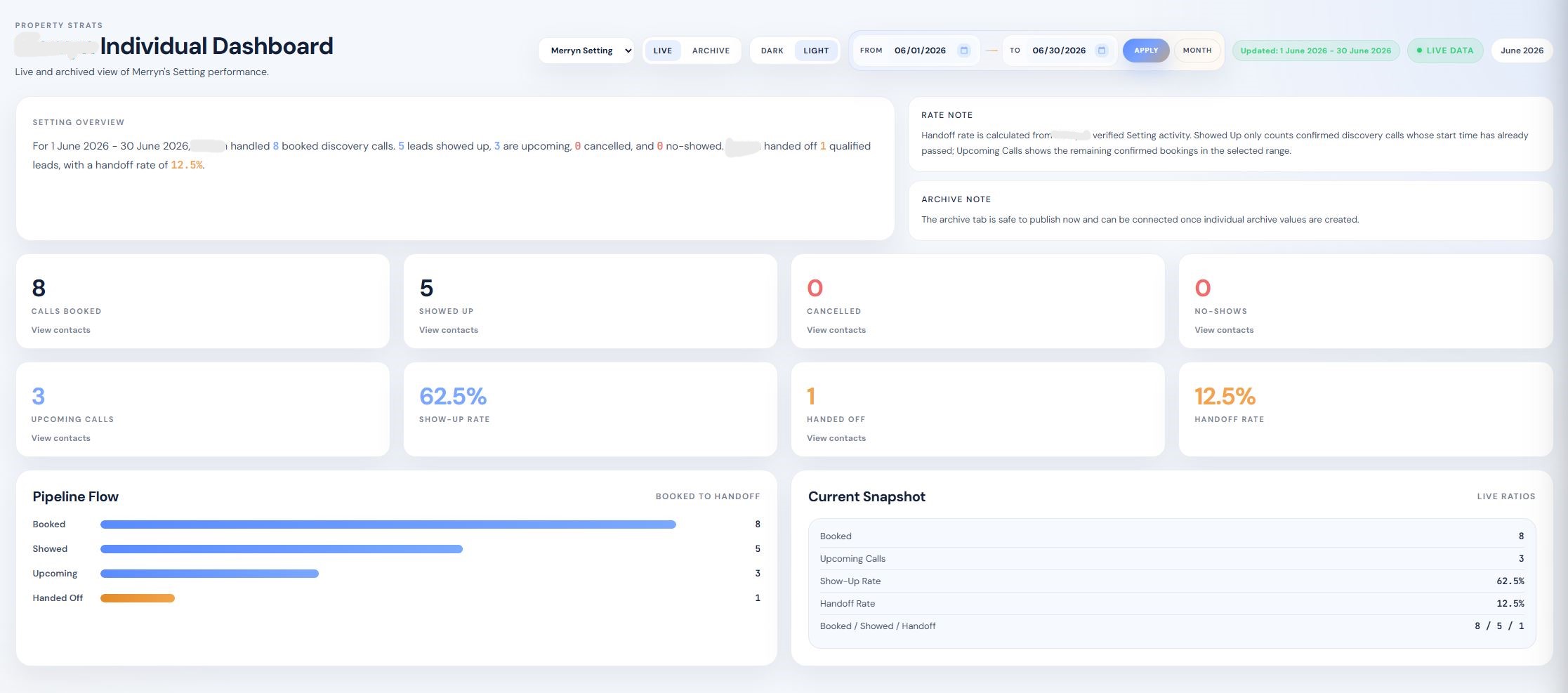
The dashboard connects summary reporting with the CRM evidence behind it. Verified outcome data will be added here when available.
[RESULT TO ADD: verified client feedback, review time saved, or reporting adoption]
Let’s build a dashboard around the decisions your team needs to make.
Discuss your dashboard