
Compare channels clearly
Bring organic and inorganic lead sources into one reporting view. This gives the team context for reviewing the leads reaching the business.
Lead-source reporting that connects channel performance to the actual contacts behind it.
Dave Van Larcena · GoHighLevel automation specialist
Understand where leads come from and evaluate source performance with contact-level evidence, alongside the wider team reporting picture.
A custom dashboard compares organic and inorganic lead sources. Clickable source metrics reveal their associated contacts and link directly to the original GHL records.
How the dashboard supports monitoring and evaluation.
Bring organic and inorganic lead sources into one reporting view. This gives the team context for reviewing the leads reaching the business.
Open the contacts behind source totals and review their records in GHL. A source can be investigated beyond its headline volume.
Source-level reporting and contact evidence support discussions about marketing effort, budget, and follow-up.
Choose a screen below. Zoom in to inspect the interface or open the original image.
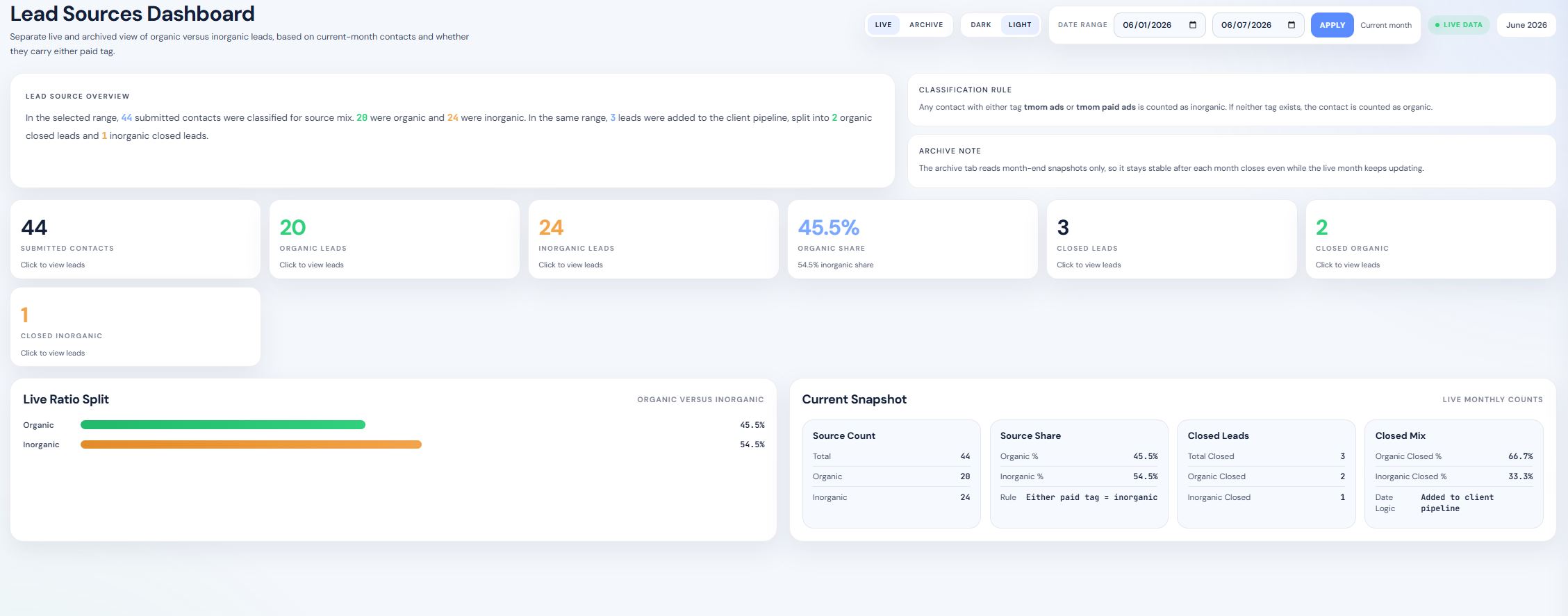
The dashboard connects summary reporting with the CRM evidence behind it. Verified outcome data will be added here when available.
[RESULT TO ADD: verified client feedback, review time saved, or reporting adoption]
Let’s build a dashboard around the decisions your team needs to make.
Discuss your dashboard